三个绑定之间
关系
绑定
├── 单向绑定(数据 → 视图)
│    ├── 插值表达式:{{ data }}
│    └── 动态绑定::attr="data"  ← 你的 scroll-top 在这里
└── 双向绑定(数据 ⇄ 视图)
     └── v-model="data"
差异
| 类型 | 方向 | 语法 | 用途 |
|---|---|---|---|
| 单向绑定 | 数据 → 视图 | 动态绑定::属性="数据" 或 v-bind:属性="数据" |
任何HTML属性 |
| 数据 → 视图 | 插值表达式:{{ 数据 }} 或 :value="数据" |
显示数据 | |
| 双向绑定 | 数据 ⇄ 视图 | v-model="数据" |
表单输入 |
案例对比
<template>
  <view style="padding: 30rpx">

    <!-- ================= 1. 单向绑定 ================= -->
    <view style="font-weight: bold">① 单向绑定(手动处理 input)</view>
	<!-- @input 就是事件监听语法。监听用户输入(视图 → 数据) -->
	<!-- :value="name" → 把数据给输入框(数据 → 视图) -->
	<!-- @input="updateName" → 监听用户输入(视图 → 数据) -->
    <input
      type="text"
      :value="name"
      @input="updateName"
      style="border:1px solid #333;height:40rpx;padding:0 10rpx;margin:10rpx 0;"
    />
	<input
	  type="text"
	  :value="name"
	  style="border:1px solid #333;height:40rpx;padding:0 10rpx;margin:10rpx 0;"
	/>
    <view>数据值:{{ name }}</view>

    <view style="margin:20rpx 0;border-top:1px solid #ddd;"></view>

    <!-- ================= 2. 双向绑定 ================= -->
    <view style="font-weight: bold">② 双向绑定(v-model 自动)</view>
    <input
      v-model="name2"
      placeholder="请输入内容"
      style="border:1px solid red;height:40rpx;padding:0 10rpx;margin:10rpx 0;"
    />
    <view>数据值:{{ name2 }}</view>
    <view style="margin:20rpx 0;border-top:1px solid #ddd;"></view>

    <!-- ================= 3. 纯单向展示 ================= -->
    <view style="font-weight: bold">③ 纯单向展示</view>
    <view
      style="border:1px dashed #999;height:40rpx;line-height:40rpx;padding:0 10rpx;margin:10rpx 0;"
    >
      {{ name3 }}
    </view>
    <view style="margin:30rpx 0;border-top:2px solid #000;"></view>
    <!-- ================= 控制按钮 ================= -->
    <button @click="changeAll" type="primary">
      点击修改所有数据
    </button>

  </view>
</template>

<script setup>
import { ref } from 'vue'

const name = ref('张三')
const name2 = ref('李四')
const name3 = ref('王五')

// 单向绑定需要手动更新
const updateName = (e) => {
  name.value = e.detail.value
}

// 统一修改数据
const changeAll = () => {
  name.value = '新张三'
  name2.value = '新李四'
  name3.value = '新王五'
}
</script>
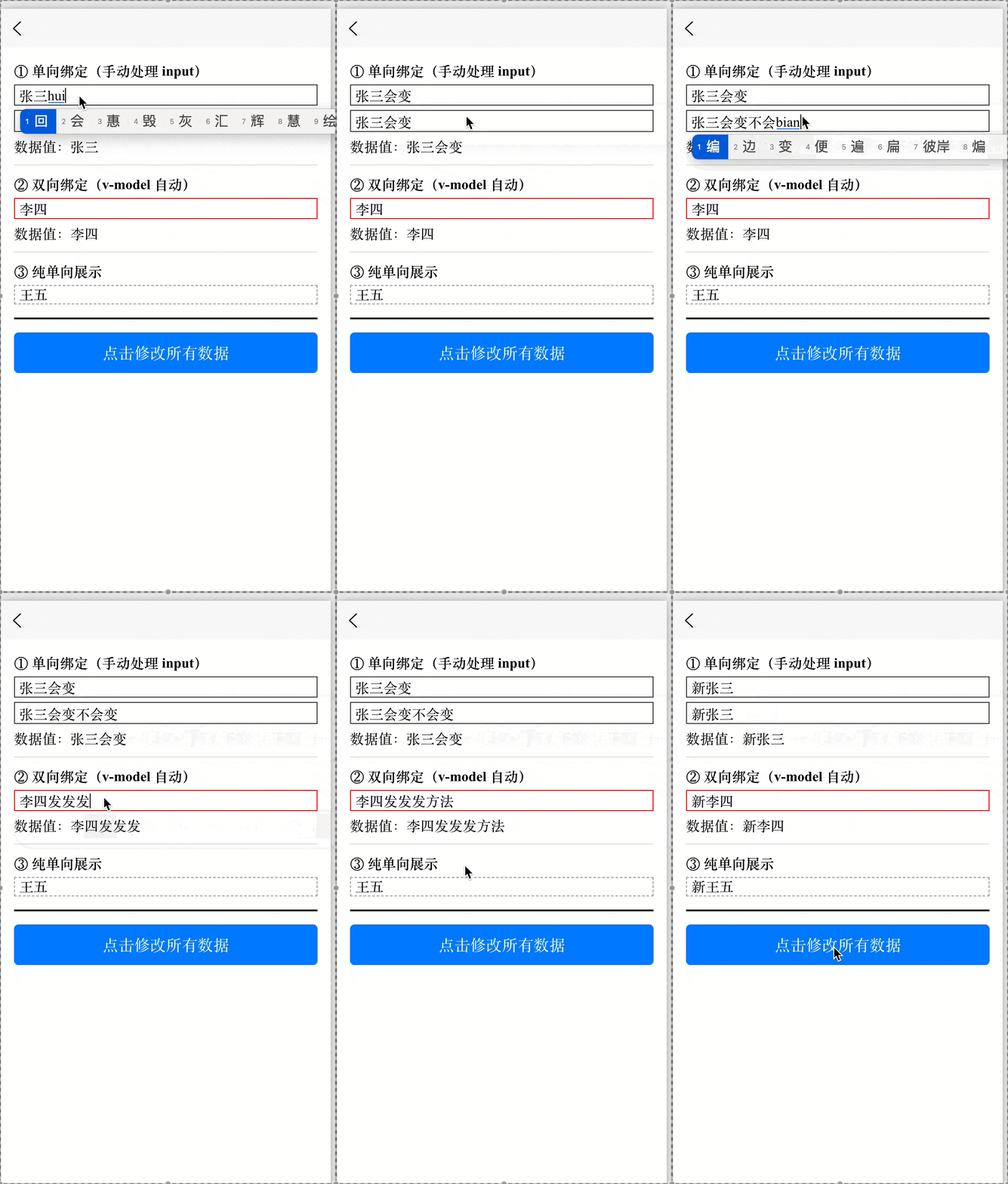
动态绑定
什么是动态绑定?
动态绑定(Dynamic Binding)是 Vue.js 提供的一种机制,允许你将 HTML 属性、元素内容、样式、事件等 与 JavaScript 数据(响应式状态) 关联起来。当数据发生变化时,视图会自动更新,无需手动操作 DOM。
✅ 核心思想:声明式地描述“视图如何依赖数据”,由 Vue 自动完成同步。
动态绑定的语法:v-bind
Vue 使用指令 v-bind 实现动态绑定。为方便书写,提供了缩写语法::(冒号)。
<!-- 完整写法 -->
<a v-bind:href="url">链接</a>

<!-- 缩写写法(推荐) -->
<a :href="url">链接</a>
其中 url 是组件实例中的一个 响应式数据属性(如 data、ref、reactive 等定义的变量)。
动态绑定的常见应用场景
绑定 HTML 属性(Attribute)
将元素的原生属性(如 src、href、disabled、title 等)绑定到 JS 表达式。
<!-- Template -->
<template>
  <div>
    <img :src="imageUrl" alt="动态图片" />
    <button :disabled="isDisabled">提交</button>
    <input type="text" :placeholder="placeholderText" />
  </div>
</template>

<script setup>
import { ref } from 'vue'

// 响应式数据
const imageUrl = ref('https://example.com/photo.jpg')
const isDisabled = ref(true)
const placeholderText = ref('请输入内容...')

// 模拟数据变化(例如 2 秒后启用按钮)
setTimeout(() => {
  isDisabled.value = false
  placeholderText.value = '现在可以输入了!'
}, 2000)
</script>
- 当
imageUrl变化 →<img>的src自动更新。 - 当
isDisabled为true→ 按钮自动禁用。
⚠️ 注意:绑定布尔属性(如 disabled、checked)时,Vue 会自动处理真假值。
绑定内联样式(Style)
使用 :style 动态设置元素的 CSS 内联样式。
对象语法(最常用)
<template>
  <div :style="{
    color: textColor,
    fontSize: fontSize + 'px',
    backgroundColor: bgColor
  }">
    这是一段动态样式的文字
  </div>
</template>

<script setup>
import { ref } from 'vue'

const textColor = ref('#45C2D3')
const fontSize = ref(24)
const bgColor = ref('#ECFBFD')
</script>
- 键(key)是 CSS 属性名(推荐驼峰式,如
fontSize)。 - 值(value)是 JS 表达式(需包含单位,如
'px'、'rpx')。
数组语法(组合多个样式对象)
<template>
  <div :style="[baseStyle, overrideStyle]">
    使用数组合并样式
  </div>
</template>

<script setup>
import { reactive } from 'vue'

const baseStyle = reactive({
  color: 'blue',
  padding: '10px',
  borderRadius: '4px'
})

const overrideStyle = reactive({
  color: 'red', // 覆盖 baseStyle 的 color
  fontWeight: 'bold'
})
</script>
- 后面的对象可覆盖前面的同名属性。
绑定 CSS 类名(Class)
使用 :class 动态切换或组合 CSS 类。
对象语法(控制类的有无)
<template>
  <div :class="{ active: isActive, error: hasError }">
    状态指示区域
  </div>
  <button @click="toggleActive">切换 active</button>
  <button @click="toggleError">切换 error</button>
</template>

<script setup>
import { ref } from 'vue'

// 初始状态:<div class="error">状态指示区域</div>
// 因为 hasError==true
const isActive = ref(false)
const hasError = ref(true)

// 点击“切换 active”后:<div class="active error">状态指示区域</div>
// 因为 isActive = true 且 hasError = true
function toggleActive() {
  isActive.value = !isActive.value
}

function toggleError() {
  hasError.value = !hasError.value
}
</script>

<style scoped>
.active {
  background-color: lightgreen;
  border: 2px solid green;
}
.error {
  color: red;
  font-weight: bold;
}
</style>
它的规则是:只有当对应的值(如 isActive、hasError)为真值(truthy)时,对应的 class 名(如 'active'、'error')才会被添加到元素上;否则,该 class 不会出现。
数组语法(组合多个类)
<template>
  <div :class="[baseClass, isSpecial ? specialClass : '', { disabled: isDisabled }]">
    多种类组合
  </div>
</template>

<script setup>
import { ref } from 'vue'

const baseClass = ref('default-style')
const isSpecial = ref(true)
const specialClass = ref('highlight')
const isDisabled = ref(false)
</script>

<style scoped>
.default-style {
  padding: 8px;
  border: 1px solid #ccc;
}
.highlight {
  background-color: yellow;
}
.disabled {
  opacity: 0.5;
  pointer-events: none;
}
</style>
数组中不同类型的处理规则
字符串(String)
直接添加(只要不是空字符串)
空字符串
''、null、undefined会被忽略:class="['always', '', null, undefined]" // → class="always"
对象(Object)
按对象语法规则处理:只添加值为真(truthy)的 key
不是“直接加整个对象”
:class="[{ active: false, error: true }]"
// → class="error" (active 被忽略)
三元表达式 / 变量
表达式先求值,再按结果的类型处理
如果结果是字符串 → 按字符串规则处理
如果结果是对象 → 按对象规则处理
// 示例1:三元返回字符串
isSpecial ? 'premium' : ''
// → 'premium'(添加) 或 ''(忽略)

// 示例2:三元返回对象
isSpecial ? { premium: true } : {}
// → { premium: true }(添加 premium) 或 {}(无效果)
:class="[baseClass, isSpecial ? specialClass : '', { disabled: isDisabled }]"
- 始终加上
baseClass;如果isSpecial为真,再加上specialClass;如果isDisabled为真,再加上disabled类。
绑定组件 Props(在组件间传递数据)
在使用子组件时,通过 :propName 将父组件的数据传递给子组件。
父组件(传递数据)
<!-- ParentComponent.vue -->
<template>
  <div>
    <UserInfoCard :title="pageTitle" :count="userCount" :loading="isLoading" />
    <button @click="updateData">更新数据</button>
  </div>
</template>

<script setup>
import { ref } from 'vue'
import UserInfoCard from './UserInfoCard.vue'

const pageTitle = ref('用户中心')
const userCount = ref(1024)
const isLoading = ref(false)

function updateData() {
  userCount.value += 100
  isLoading.value = true
  setTimeout(() => {
    isLoading.value = false
  }, 1000)
}
</script>
子组件(接收 Props)
<!-- UserInfoCard.vue -->
<template>
  <div class="card">
    <h3>{{ title }}</h3>
    <p>当前用户数:{{ count }}</p>
    <p v-if="loading">加载中...</p>
  </div>
</template>

<script setup>
// 定义接收的 props
const props = defineProps({
  title: {
    type: String,
    required: true
  },
  count: {
    type: Number,
    default: 0
  },
  loading: {
    type: Boolean,
    default: false
  }
})
</script>

<style scoped>
.card {
  border: 1px solid #ddd;
  padding: 16px;
  margin: 10px 0;
}
</style>
- 子组件通过
defineProps({ title: String, count: Number })接收。 - 当
pageTitle或userCount变化,子组件自动重新渲染。
绑定其他特殊属性
绑定
key:用于列表渲染中提示 Vue 元素的唯一性。<template> <ul> <li v-for="item in list" :key="item.id"> {{ item.name }} </li> </ul> <button @click="addItem">添加新项</button> </template> <script setup> import { ref } from 'vue' let id = 3 const list = ref([ { id: 1, name: '苹果' }, { id: 2, name: '香蕉' } ]) function addItem() { list.value.push({ id: ++id, name: '新水果' + id }) } </script>绑定
ref:获取 DOM 元素或子组件实例(Vue 3 中常用ref())。<template> <input ref="inputRef" placeholder="聚焦我" /> <button @click="focusInput">聚焦输入框</button> </template> <script setup> import { ref, nextTick } from 'vue' const inputRef = ref(null) function focusInput() { // 确保 DOM 已更新 nextTick(() => { inputRef.value?.focus() }) } </script>绑定 ARIA 属性、自定义属性等:
<template>
  <button
    :aria-label="buttonLabel"
    :data-role="userRole"
    @click="handleClick"
  >
    操作按钮
  </button>
</template>

<script setup>
import { ref } from 'vue'

const buttonLabel = ref('点击以保存当前表单')
const userRole = ref('admin')

function handleClick() {
  console.log('当前角色:', userRole.value)
}
</script>
动态绑定的本质
不是字符串拼接,而是 JavaScript 表达式求值。
<!-- ❌ 错误:这是字符串,不会执行 JS -->
<div style="color: textColor"></div>

<!-- ✅ 正确:表达式会被求值 -->
<div :style="{ color: textColor }"></div>
支持任意合法 JS 表达式(但不支持语句,如
if、for):<div :title="message.split(' ').reverse().join(' ')"></div>响应式驱动:只有绑定的数据是响应式的(如
ref、reactive、data),视图才会自动更新。
注意事项
属性名大小写
HTML 属性不区分大小写,但 Vue 会智能处理:在模板中建议始终使用 kebab-case(短横线命名) 绑定原生属性:
<video :poster-image="posterUrl"> <!-- ❌ 不推荐 -->
<video :poster="posterUrl">       <!-- ✅ 正确 -->
避免复杂逻辑写在模板中
复杂计算应放在computed或方法中:<!-- 不推荐 --> <div :class="{ red: items.length > 10 && !loading }"> <!-- 推荐 --> <div :class="{ red: shouldHighlight }">computed: { shouldHighlight() { return this.items.length > 10 && !this.loading; } }安全转义
Vue 会对绑定的内容自动进行 HTML 转义(防止 XSS),除非使用v-html(需谨慎)。