定义
left、top、right、bottom 是 CSS 定位(positioning)系统中的偏移属性,用于精确控制元素的位置。
这些属性 只有在元素的 position 值不是 static(默认值)时才生效。即:position: relative、absolute、fixed、sticky 时可用。
它们定义了「元素的某条边」距离「其定位上下文对应边」的偏移量。
| 属性 | 控制哪条边? | 相对于谁? | 增大值 → 元素往哪走? |
|---|---|---|---|
left |
元素的 左边缘 | 定位上下文的 左边缘 | → 向右 移动 |
top |
元素的 上边缘 | 定位上下文的 上边缘 | ↓ 向下 移动 |
right |
元素的 右边缘 | 定位上下文的 右边缘 | ← 向左 移动 |
bottom |
元素的 下边缘 | 定位上下文的 下边缘 | ↑ 向上 移动 |
方向
left: 20rpx 表示:把元素的左边缘,放到「定位上下文左边缘往右 20rpx」的位置。
👉 实际上是向右移动!
- ❌ 错误理解:“
left: 20就是让元素向左边移动 20 个单位”
假设有一个容器(定位上下文)宽 300rpx:
定位上下文(父容器)
┌──────────────────────────────┐
0                              300rpx
│                              │
│                              │
└──────────────────────────────┘
情况 1:元素默认位置(left: auto 或未设置)
.child { position: absolute; }
→ 浏览器会把它放在 左上角(0, 0)。
┌──────────────────────────────┐
│[■■■]                         │ ← 元素贴在最左边
└──────────────────────────────┘
情况 2:设置 left: 20rpx
.child { position: absolute; left: 20rpx; }
→ 元素的左边缘被推到 距离父容器左边 20rpx 的地方 → 向右移动了 20rpx!
┌──────────────────────────────┐
│    [■■■]                     │ ← 向右偏移了!
└──────────────────────────────┘
     ↑
   20rpx
定位上下文
定位上下文(Positioning Context)就是 当前这个元素在定位时所“参考”的那个父容器。
它不是随便哪个父元素,而是:最近的、position 不是 static(即 relative / absolute / fixed / sticky)的祖先元素。
如果找不到这样的祖先,那就以 整个页面视口(viewport) 为参考。
简单说:你爸爸(或爷爷)中第一个“有定位能力”的人,就是你的定位上下文。
<template>
  <view class="grandparent">
    <!-- 没有定位,不是定位上下文 -->

    <view class="parent">
      <!-- 有 position: relative,成为定位上下文 -->

      <view class="child">我是子元素</view>
    </view>
  </view>
</template>

<style scoped>
.grandparent {
  width: 750rpx;
  height: 800rpx;
  background: #f0f0f0;
  padding: 100rpx; /* 留点空间 */
}

.parent {
  width: 500rpx;
  height: 400rpx;
  background: lightblue;
  /* 👇 关键:让它成为定位上下文 */
  position: relative;
  margin: 0 auto; /* 水平居中,方便观察 */
}

.child {
  width: 150rpx;
  height: 100rpx;
  background: coral;
  position: absolute;
  left: 50rpx; /* ← 这里的 "left" 参考谁? */
  top: 50rpx;
}
</style>
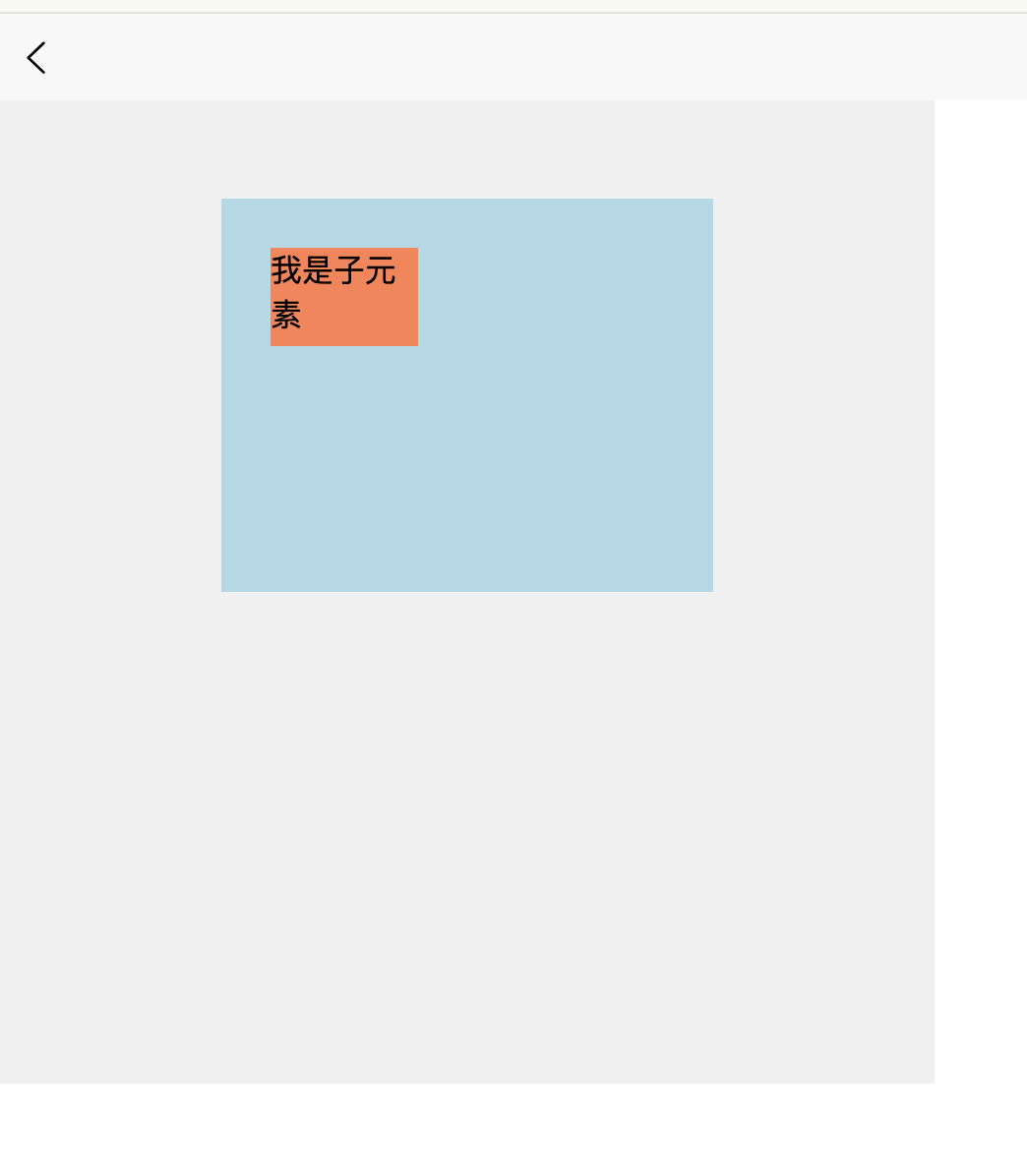
问题:left: 50rpx 中的 “50rpx” 是从哪里开始量的?
✅ 答案:从 .parent 的左边缘开始量!
页面(grandparent)
┌──────────────────────────────────────┐
│                                      │
│   .parent(定位上下文)              │
│   ┌──────────────────────────────┐   │
│   │                              │   │
│   │  ↑                           │   │
│   │ 50rpx                        │   │
│   │  ↓                           │   │
│   │  ┌──────────────┐            │   │
│   │  │   .child     │            │   │
│   │  └──────────────┘            │   │
│   │  ↑                           │   │
│   │ 50rpx(left 值)             │   │
│   └──────────────────────────────┘   │
│        ↑                             │
│        └── 这就是“定位上下文的左边缘” │
└──────────────────────────────────────┘
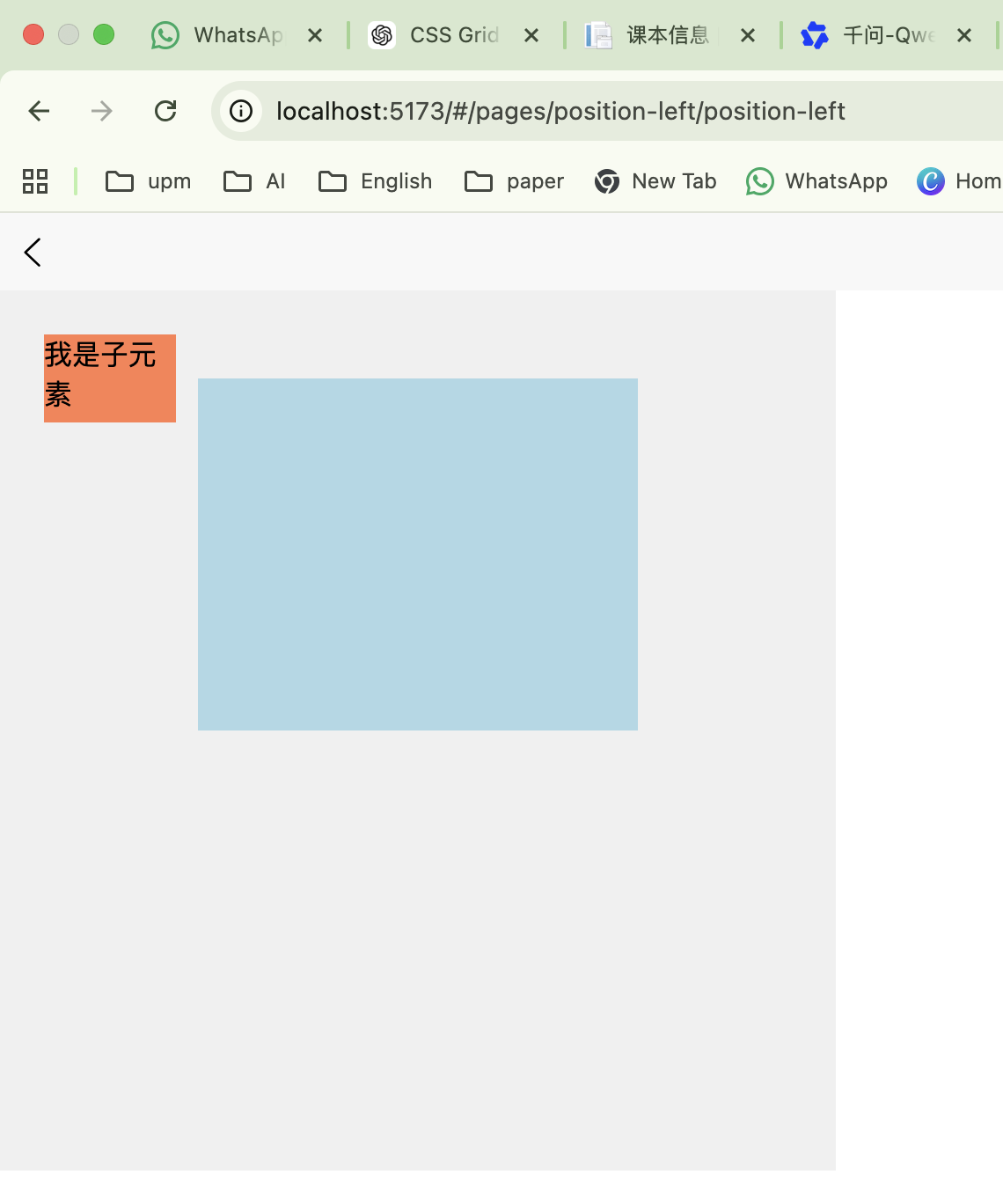
如果父元素没有定位呢?把上面例子中的 .parent 的 position: relative 去掉:
.parent {
  /* position: relative; ← 注释掉 */
}
→ .child 会向上找,发现 .grandparent 也没有定位(默认 static);
→ 最终,定位上下文变成整个页面(视口);
→ left: 50rpx 就变成 距离屏幕左边 50rpx!
屏幕
┌──────────────────────────────────────┐
│                                      │
│50rpx → ┌──────────────┐              │
│        │   .child     │              │
│        └──────────────┘              │
│                                      │
│        .parent(不再作为参考)       │
│        ┌──────────────────────┐      │
│        │                      │      │
│        └──────────────────────┘      │
└──────────────────────────────────────┘
❗ 这就是为什么:要让子元素相对于某个父容器定位,父容器必须设置 position: relative(或其他非-static 值)!
不同 position 值下的行为对比
position: relative(相对定位)
- 元素仍在文档流中(占位);
left/top/right/bottom表示 相对于它“原本位置”的偏移;- 其他元素不会感知它的移动(空间仍被保留)。
.box {
  position: relative;
  left: 50rpx;   /* 向右移动 50rpx */
  top: 30rpx;    /* 向下移动 30rpx */
}
✅ 用途:微调位置、制作动画起点、配合绝对定位子元素。
position: absolute(绝对定位)
- 元素脱离文档流(不占位,其他元素会“无视”它);
left/top/right/bottom相对于最近的非-static 定位祖先;- 如果祖先都没有定位,则相对于初始包含块(通常是视口)。
.parent {
  position: relative; /* 成为定位上下文 */
}
.child {
  position: absolute;
  left: 20rpx;
  top: 20rpx; /* 距离 .parent 左上角 20rpx */
}
✅ 用途:弹窗、悬浮按钮、居中布局、覆盖层。
position: fixed(固定定位)
- 类似
absolute,但定位上下文永远是视口(viewport); - 滚动页面时,元素固定不动。
.header {
  position: fixed;
  top: 0;
  left: 0;
  width: 100%;
}
✅ 用途:顶部导航栏、返回顶部按钮、悬浮客服。
4. position: sticky(粘性定位)
- 混合模式:默认像
relative,但当滚动到阈值时,表现像fixed; - 必须配合
top/bottom使用(left/right支持较弱)。
.sticky-title {
  position: sticky;
  top: 0; /* 滚动到顶部时“吸顶” */
}
✅ 用途:列表分组标题、表格表头吸顶。
关键规则与技巧
left 和 right 可同时设置(top/bottom 同理)
.full-width {
  position: absolute;
  left: 0;
  right: 0; /* 自动宽度 = 100% */
}
💡 当同时设置
left+right,且未设width时,元素宽度 = 容器宽度 - left - right。
规则 2:冲突时的优先级
- 水平方向:
left优先级 >right(如果写了left,right会被忽略,除非left: auto); - 垂直方向:
top优先级 >bottom; - 但现代浏览器通常能智能处理(如
left:0; right:0正常工作)。
值可以是
- 长度:
10rpx,20px,1em - 百分比:
50%(相对于定位上下文的宽/高) auto(默认值,表示“不偏移”)
值为负数
负数表示“反方向偏移”。
| 属性 | 负值效果 | 移动方向 | 是否超出容器 |
|---|---|---|---|
left: -N |
左边缘在定位上下文左边 N 处 | ← 向左 | 是(左) |
top: -N |
上边缘在定位上下文上边 N 处 | ↑ 向上 | 是(上) |
right: -N |
右边缘在定位上下文右边 N 处 | → 向右 | 是(右) |
bottom: -N |
下边缘在定位上下文下边 N 处 | ↓ 向下 | 是(下) |
left: -20rpx 与left: 20rpx
图示:
定位上下文
← 负 x 方向        原点 (0)         正 x 方向 →
... ────|───────────────┬─────────────────────── ...
       -20             0                       +100
                        ↑
                  定位上下文左边缘(x = 0)
left: 20rpx→ 元素左边缘放在 x = +20 的位置(在原点右边);- 元素左边缘位于「定位上下文左边缘左侧 20rpx 处」
left: -20rpx→ 元素左边缘放在 x = -20 的位置(在原点左边)。元素左边缘位于「定位上下文左边缘右侧 20rpx 处」
定位上下文(父容器)
        ┌──────────────────────┐
        │                      │
← 20rpx →│                      │
[■■■]   │                      │
        └──────────────────────┘
↑
元素左边缘在这里(在父容器左边外面)
top: -30rpx :把元素的上边缘,放到「定位上下文上边缘往上 30rpx」的位置。
元素向上移动,超出定位上下文的上边框。
        ↑
      [■■■] ← 元素顶部在这里(在父容器上面外面)
        │
        ├──────────────────────┤ ← 定位上下文上边缘
        │                      │
        │                      │
        └──────────────────────┘